
↓ 跳过正文
  1. 文章/

Wake on LAN 第一部分介绍

·
Rubén Infante Docio
作者
Rubén Infante Docio
软件工程师
局域网上的觉醒 - 这篇文章属于一个选集。
§ 1: 本文

Android Wol 局域网

今天我们开始一系列教程,教你如何在同一局域网或通过互联网(例如服务器)开启网络中的另一台Linux电脑。

基础
#

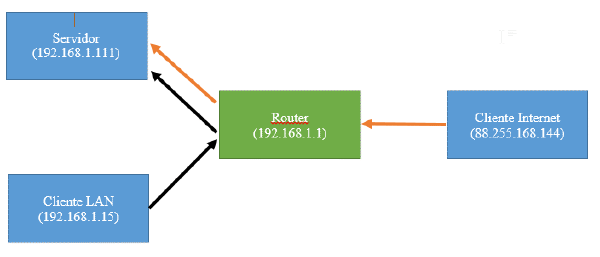
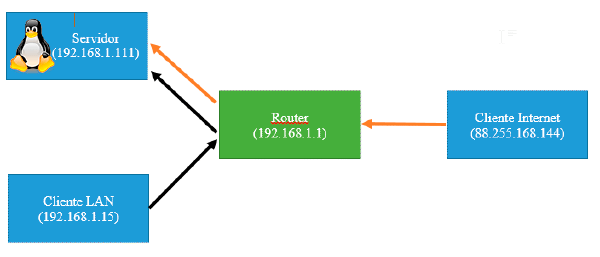
WOL:Wake On LAN 是一项技术,允许我们远程在网络上开启电脑。 WAN:此例中指的是通过 WWAN 互联网在局域网上的 Wake。 MAC:它是网络卡的物理地址,即唯一标识符。 服务器:这次我们想远程开启的是电脑。 客户端:在这种情况下,设备会向服务器发送开机命令。 步骤

  1. 配置服务器的BIOS,这样当我们关机时,网卡会监听“Magic package”的电源请求。
    1. 为此,我们会在启动电脑后,重启电脑并按(根据型号选择 DEL 或 F2)进入 BIOS。
    2. 我们会找BIOS区域,电源(Power)或电源(BOOT)选项根据型号配置。
    3. 我们会激活网络、WOL、PME(电源管理事件)等选项。
    4. 我们会存钱,正常和F10一起出去。
    5. 如果找不到这些选项,可以搜索“激活标记品牌_BIOS”,可以在电脑启动时第一个出现的界面找到BIOS标记。
  2. 我们会获得想开启的PC当前IP和其网络接口的MAC
    1. 我们开设航站楼

    2. 我们输入命令

      //Windows
      ipconfig /all
      //Linux
      ifconfig
      //Linux puerta de enlace
      netstat -nr|head -3|tail -1 |cut -d" " -f10
    3. 我们从网络接口(以eth0为例)获取以下数据,如前所述  可变Linux WindowsIPOFSERVER 指令。inet: IPv4地址 MACOFSERVER地址硬件物理地址 INTERFACEOFSERVEReth0以太网适配器:GATEWAY默认网关

  3. 配置路由器, 即使我们配置了固定IP,这种情况下关闭后,路由器会分配它认为合适的IP,所以我们会从MAC告诉它,即使关闭了,它也会分配相同的IP,而不考虑系统的配置。
    1. 现在的路由器可能可以跳过这一步,因为很多路由器总是试图用同一个MAC地址处理同一IP,但确认一下也无妨。
    2. 为MAC服务器配置静态ARP表。
      1. 比如,我的路由器上用的是Jazztel的华为HG622
        1. 我们通过telnet访问路由器,将网络网关放在软泥](http://the.earth.li/~sgtatham/putty/latest/x86/putty.exe)[。

        2. 我们可以通过操作Windows按钮 ->cmd->ipconfig/all ->,然后查找连接的“网关”来查询。

        3. 输入用户名和密码,分别是管理员和管理员

        4. 输入“sh”以进入壳体

        5. 我们输入了前一步获得的以下命令

          //Primero para ver el formato en que debemos introducirlo
          arp
          //(sin comillas)
          arp "ipdelequiposervidor" "macdelequiposervidor" -s
      2. 这部分在所有路由器上都不一样,所以我建议你谷歌“Assign same IP always name_router”或者“fixed ARP tablename_router”。

明智的提示:以前并非所有电脑都支持 Wake on 局域网,而有的电脑需要从网卡连接一根线到主板,主板也必须支持。

目前所有PCS都集成了这一功能
局域网上的觉醒 - 这篇文章属于一个选集。
§ 1: 本文

相关文章


Comentarios

  • […] WOL (Enciende tu PC remotamente) Parte 1 Introducción […]
  • […] ← Anterior Siguiente → […]
  • MatiasCG
    MatiasCG
    Buenas, gracias por tu aporte. Una pregunta, es necesario que exista un servidor? No se puede realizar un wwan si solo tengo el router y la pc que quiero encender? Saludos
    • ruben0909

      Sí claro, en este caso estoy llamo “servidor” al PC que quieres encender. En contraposición al cliente que es el que lo enciende.

      Un saludo

  • […] WOL (Enciende tu PC remotamente) Parte 1 Introducción […]
  • […] WOL (Enciende tu PC remotamente) Parte 1 Introducción […]
  • […] WOL (Enciende tu PC remotamente) Parte 1 Introducción […]
  • Jose Bonifas
    Jose Bonifas

    Hola, bo consigo asignar valor arp en router. Si se consigue, cada vez que se reinicia router se pierde el valor.

    No consigo que el pc arranque a remoto, si en la misma red.

    Un saludo.

    • Rubén Infante Docio

      Hola Jose, Al introducir el comando prueba con arp -s “ipdelequiposervidor” “macdelequiposervidor”

      Es decir, como en el post pero con la “-s” antes de la ip y la MAC.

      En caso de que tampoco funcione, siempre puedes hacer un script en bash para que se ejecute cada vez que se reinicie el router.

      Un saludo

      • Jose Bonifas
        Jose Bonifas

        Hola, Ruben, ¿como se puede hacer un script para que envie mail de notificacion?

        Un saludo.

        • Rubén Infante Docio
          Hola Jose, Pues depende un poco de cómo tengas montado el sistema. Si tu SO es un linux tendrás que hacer un script unix. Si tu SO es Windows puedes hacer un Script en Powershell. Ambos deberán ejecutarse al inicio, y enviar un email. Hay mucha información en internet sobre cómo hacer esto y aquí en el blog hay varios post que contienen scripts que hacen esto. Quizá la parte más complicada sea detectar si el pc se ha encendido mediante botón o WOL, pero ya sabés San Google es tu amigo. Quizá puedes empezar por aquí Cualquier duda me dices.
          • Jose
            Jose

            Buenas tardes, no puedo instalar el Power Shell en windows 7, ¿alguna ayuda?

            Un saludo.

  • […] Abres el puerto 32400 como se indica aquí […]
  • Lucio Macy
    Lucio Macy
    Actually when someone doesn’t understand then its up to other people that they will help, so here it happens.
  • Alena Kraegen
    Alena Kraegen
    Aw, this was an extremely nice post. Spending some time and actual effort to produce a great article… but what can I say… I put things off a lot and don’t seem to get nearly anything done.
    • Rubén Infante Docio

      Hi Alena, There are two main problems that you can have.

      1. Open the next port in the nat section of yoyr router. 6,7,8,9,11.
      2. In some computers only works if you turn off your computer properly.Not from button.
      3. Check your BIOS config. And check the instructions of your bios about that.
  • Angie O'Driscoll
    Angie O'Driscoll
    Definitely believe that which you said. Your favourite reason seemed to be at the web the easiest thing to take into account of. I say to you, I definitely get annoyed while other people consider issues that they plainly do not recognise about. You managed to hit the nail upon the highest and also defined out the whole thing with no need side effect , other folks can take a signal. Will probably be back to get more. Thanks
  • Latanya Rene
    Latanya Rene
    Hello, after reading this remarkable piece of writing i am as well delighted to share my knowledge here with friends.
  • Leonel Shipman
    Leonel Shipman
    I think the admin of this web page is in fact working hard in favor of his website, because here every material is quality based stuff.
  • Ellis Muskett
    Ellis Muskett
    Thanks for every other informative web site. The place else may just I get that kind of info written in such an ideal way? I’ve a project that I’m simply now operating on, and I’ve been at the look out for such information.
  • Houston Bellew
    Houston Bellew
    Attractive section of content. I simply stumbled upon your site and in accession capital to assert that I acquire actually loved account your blog posts. Any way I will be subscribing on your augment or even I success you get right of entry to persistently quickly.
  • Salvatore Nerli
    Salvatore Nerli
    I take pleasure in, cause I discovered just what I used to be taking a look for. You have ended my four day long hunt! God Bless you man. Have a great day. Bye
  • Sol Giffen
    Sol Giffen
    Can I just say what a relief to discover someone who genuinely understands what they are talking about on the internet. You definitely know how to bring an issue to light and make it important. More and more people ought to read this and understand this side of your story. I can’t believe you aren’t more popular because you most certainly possess the gift.
  • Whitney Walch
    Whitney Walch
    Paragraph writing is also a excitement, if you be familiar with afterward you can write if not it is complex to write.