
To review a little more about that fantastic code repository that is Git and set up a free private server I’m reading the book that you can find here, but as my memory is finite I’ve written a summary with the basic client, server and usage installation commands that you can find below:
Introduction#
What is Git?#
From wikipedia Git is a](http://es.wikipedia.org/wiki/Control_de_versiones “Control de versiones”) [version control software designed by Linus Torvalds (LinuxKernel Creator ), thinking about the efficiency and reliability of application version maintenance when applications have a large number of source files. At first, Git was intended as a low-level engine on which others could write the user interface or front end as Cogito. However, Git has since evolved into a full-featured version control system. 3 There are some very relevant projects that already use Git, in particular, the programming group of the Linux](http://es.wikipedia.org/wiki/N%C3%BAcleo_Linux “Núcleo Linux”)kernel [. The maintenance of the Git software is currently (2009) supervised by Junio Hamano, who receives contributions to the code from around 280 programmers.
Why and why use Git?#
Personally, I think that the confrontation is between Git and TFS, which are two good and updated services that allow us to manage our code.
Below I present a small comparison to decide in which cases we should use one or the other from my point of view.
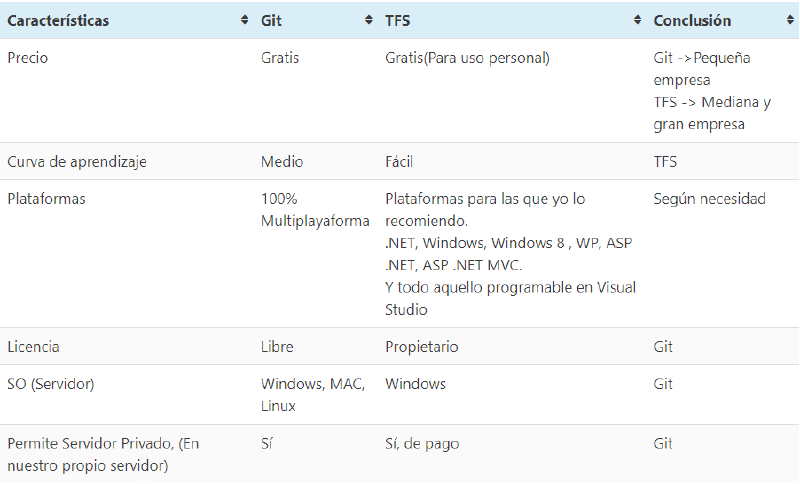
In the case of TFS, although there are integration plugins with Eclipse and you can integrate Github and use it with XCode, these solutions are far from ideal.
Installation and configuration#
After this rant we go to the :D
#Instalamos lo necesario
apt-get install libcurl4-gnutls-dev libexpat1-dev gettext libz-dev git git-core gitweb
#Configuramos nuestro usuario
git config --global user.name "Rubén Infante"
git config --global user.email ruben0909@gmail.com
# Editor predeterminado que más nos guste, en mi caso nano :D
git config --global core.editor nano
# Herramienta para diff (ver diferencias de código)
git config --global merge.tool vimdiff
# Comprobar tu configuración
git config --list
#Puede que veas claves repetidas, Git lee la misma clave de distintos archivos (/etc/# y ~/.gitconfig). En ese caso, Git usa el último valor para cada clave única.
#Puedes comprobar qué valor cree Git que tiene una clave específica ejecutando
#git config {clave}:
git config user.name