
As you can see in the post Asterisk + Superfecta + XBMC I’m playing with Asterisk lately, and although it’s great to stop the movie if they call you, it’s even better if it tells you who’s calling you instead of their phone number.
That’s why I started looking for how to import my Google contacts to Asterisk, as always, there were](http://google.es) things in [Google, but it had to be tweaked a bit.
If, like me, most of your contacts aren’t added with country_code.
Use this googlecontacts.py to pass them correctly.
# instalar python
sudo aptitude install python python-expat python-openssl
#Instala Gdata para acceder a datos de Google
wget https://gdata-python-client.googlecode.com/files/gdata-2.0.17.zip
unzip -x gdata-2.0.17.zip
cd gdata-2.0.17
./setup.py install
# Descargate googlecontacts.py modificado para España (Valido para cualquier otro pais sustituyendo 34)
# Modificado a partir de http://www.baablogic.net/googlecontacts.py
wget https://talleradmin.com/ARCHIVOSMIOS/googlecontacts.py
# MODIFICA EL USUARIO Y PASSWORD
sudo aptitude install nano
sudo nano googlecontacts.py
#Por último ejecuta el script
sudo python googlecontacts.py
If you want the sync to be automatic.
#Pone una tarea para que se actualice cada 23 horas
23 * * * * /usr/local/bin/python /usr/local/bin/googlecontacts.py > /dev/null 2>&1
Now go to:
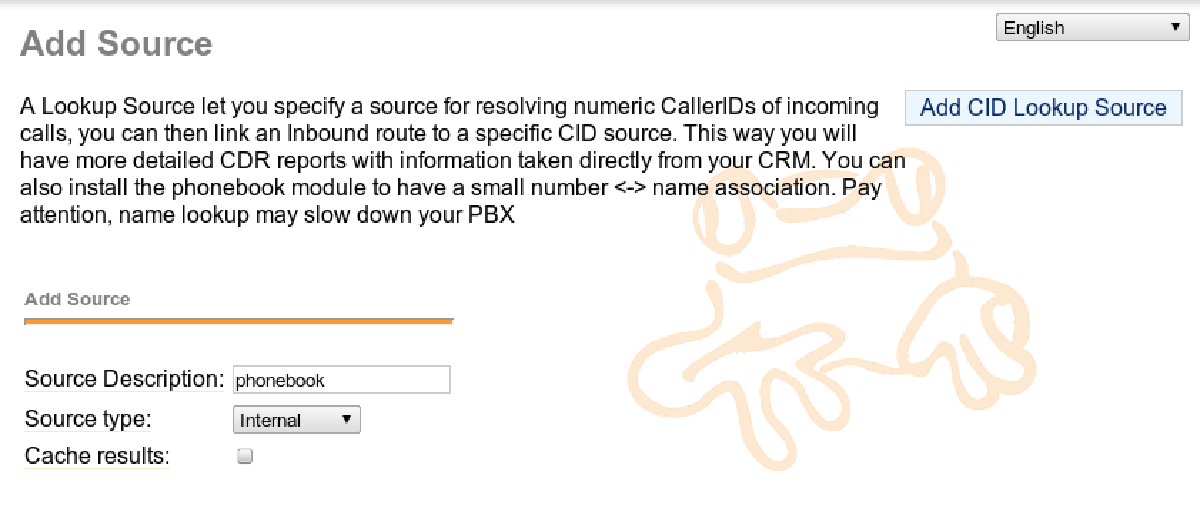
Admin -> Caller ID Lookup Sources and put the data as seen in the header image